

什么是JAVA#
什么是JAVA?不就是杯咖啡吗(○` 3′○)( 谁说的,有可能还是个妹子╰( ̄ω ̄o)(((
java是纯面向对象编程的语言。亲身经历:学JAVA无法解决单身问题
如何理解面向对象编程?#
以下转自博客园的这个帖子。
例如我们设计一个桌球游戏(略过开球,只考虑中间过程)
A:面向过程方式思考:
把下述的步骤通过函数一步一步实现,这个需求就完成了。(只为演示概念,不细究逻辑问题)。
① palyer1 击球 —— ② 实现画面击球效果 —— ③ 判断是否进球及有效 —— ④ palyer2击球
⑤ 实现画面击球效果 —— ⑥ 判断是否进球及有效 —— ⑦ 返回步骤 1—— ⑧ 输出游戏结果
B:面向对象方式思考:
经过观察我们可以看到,其实在上面的流程中存在很多共性的地方,所以我们将这些共性部分全集中起来,做成一个通用的结构
- 玩家系统:包括 palyer1 和 palyer2
- 击球效果系统:负责展示给用户游戏时的画面
- 规则系统:判断是否犯规,输赢等
我个人结合博客园帖子的理解:
面向对象更像是做一个锤子,一个普遍性工具,一个实现循环显示数字的代码可以到多个地方应用,比如显示数字,让小灯循环亮起。需要这个功能调用这个类就可以了,方便快捷。但是缺点显而易见的,锤子不可能适合砸所有东西,这样面向对象也是,需要对应的库来实现。
面向过程更像是定制化,效率高,但是添加新东西,需要写代码,相当于造一个专用的扳手。
向世界问好#
代码#
public class HelloWorld{  //JAVA系统的类,文件名必须和类名相同
public static void main(String[]args){   //定义main方法(函数),
//一个 java 程序运行必须而且有且仅有一个 main 方法。
//JAVA程序开始,String(str)表明数据类型,args表示数组
		System.out.println("hello,world"); //显示HelloWorld
	}  //注意:方法必须用大括号括起来
}
注意: Java 是大小写敏感的,这就意味着标识符 Hello 与 hello 是不同的
编译JAVA#
win+R进入命令行,cd到Java文件所在目录,输入 javac + 文件名(带扩展名)编译。
C: Users 35367 Desktop'TT>javac Hello.java运行#
编译完成后,输入java + 文件名(不带后缀),运行

可能出现的问题#
有的时候编译完成,运行,会出现这样的问题,那是编码方式不对。
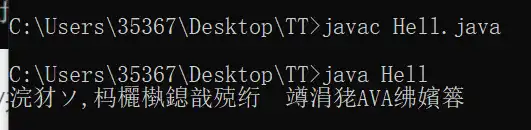
就需要修改编码格式
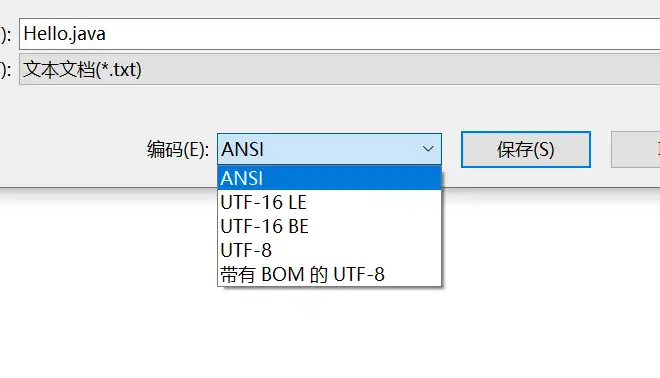
另存为ANSI格式即可正常运行
安装Eclipse#
任何东西只要娘化就会非常有趣,比如Eclipse娘 所以这才是程序员真正的快乐吗?
具体的安装可以参考这个教程:
当然 IDEA也不错,此教程是使用IDEA完成的
JAVA基本语法#
分隔符#
分号(";")(英文):语句结束标记,for循环看分割不同成分 。
圆点(“.”):用于分割“类”中的函数,可以理解为Python里的 os.listdir 这段里圆点的作用(调用OS模块里面的listdir函数)
空格(" “):分割源代码里的不同部分,例如 int a; int b;
花括号(“}”):用于限定某一部分的范围,成对使用
例如:
public class Text {
piblic static void main (String[]args){
      System.out.println("Hello");

	}
}标识符#
起到表示作用的符号。(用来给类、对象、方法、变量、接口和自定义数据类型命名的。)
命名规则:由数字,字母和下划线(_),美元符号($)或人民币符号(¥)组成。
例如:
myName,My_name,Points,$points,_sys_ta,OK,_23b,_3_
非法标识符:
25name,class&time,if
JAVA关键字#
| Java 关键字类别 | Java 关键字 | 关键字含义 |
|---|---|---|
| 访问控制 | private | 一种访问控制方式:私用模式,访问控制修饰符,可以应用于类、方法或字段(在类中声明的变量) |
| 访问控制 | protected | 一种访问控制方式:保护模式,可以应用于类、方法或字段(在类中声明的变量)的访问控制修饰符 |
| 访问控制 | public | 一种访问控制方式:共用模式,可以应用于类、方法或字段(在类中声明的变量)的访问控制修饰符。 |
| 类、方法和变量修饰符 | abstract | 表明类或者成员方法具有抽象属性,用于修改类或方法 |
| 类、方法和变量修饰符 | class | 声明一个类,用来声明新的 Java 类 |
| 类、方法和变量修饰符 | extends | 表明一个类型是另一个类型的子类型。对于类,可以是另一个类或者抽象类;对于接口,可以是另一个接口 |
| 类、方法和变量修饰符 | final | 用来说明最终属性,表明一个类不能派生出子类,或者成员方法不能被覆盖,或者成员域的值不能被改变,用来定义常量 |
| 类、方法和变量修饰符 | implements | 表明一个类实现了给定的接口 |
| 类、方法和变量修饰符 | interface | 接口 |
| 类、方法和变量修饰符 | native | 用来声明一个方法是由与计算机相关的语言(如 C/C++/FORTRAN 语言)实现的 |
| 类、方法和变量修饰符 | new | 用来创建新实例对象 |
| 类、方法和变量修饰符 | static | 表明具有静态属性 |
| 类、方法和变量修饰符 | strictfp | 用来声明 FP_strict(单精度或双精度浮点数)表达式遵循 IEEE 754 算术规范 |
| 类、方法和变量修饰符 | synchronized | 表明一段代码需要同步执行 |
| 类、方法和变量修饰符 | transient | 声明不用序列化的成员域 |
| 类、方法和变量修饰符 | volatile | 表明两个或者多个变量必须同步地发生变化 |
| 程序控制 | break | 提前跳出一个块 |
| 程序控制 | continue | 回到一个块的开始处 |
| 程序控制 | return | 从成员方法中返回数据 |
| 程序控制 | do | 用在 do-while 循环结构中 |
| 程序控制 | while | 用在循环结构中 |
| 程序控制 | if | 条件语句的引导词 |
| 程序控制 | else | 用在条件语句中,表明当条件不成立时的分支 |
| 程序控制 | for | 一种循环结构的引导词 |
| 程序控制 | instanceof | 用来测试一个对象是否是指定类型的实例对象 |
| 程序控制 | switch | 分支语句结构的引导词 |
| 程序控制 | case | 用在 switch 语句之中,表示其中的一个分支 |
| 程序控制 | default | 默认,例如:用在 switch 语句中,表明一个默认的分支。Java8 中也作用于声明接口函数的默认实现 |
| 错误处理 | try | 尝试一个可能抛出异常的程序块 |
| 错误处理 | catch | 用在异常处理中,用来捕捉异常 |
| 错误处理 | throw | 抛出一个异常 |
| 错误处理 | throws | 声明在当前定义的成员方法中所有需要抛出的异常 |
| 包相关 | import | 表明要访问指定的类或包 |
| 包相关 | package | 包 |
| 基本类型 | boolean | 基本数据类型之一,声明布尔类型的关键字 |
| 基本类型 | byte | 基本数据类型之一,字节类型 |
| 基本类型 | char | 基本数据类型之一,字符类型 |
| 基本类型 | double | 基本数据类型之一,双精度浮点数类型 |
| 基本类型 | float | 基本数据类型之一,单精度浮点数类型 |
| 基本类型 | int | 基本数据类型之一,整数类型 |
| 基本类型 | long | 基本数据类型之一,长整数类型 |
| 基本类型 | short | 基本数据类型之一,短整数类型 |
| 基本类型 | null | 空,表示无值,不能将 null 赋给原始类型(byte、short、int、long、char、float、double、boolean)变量 |
| 基本类型 | true | 真,boolean 变量的两个合法值中的一个 |
| 基本类型 | false | 假,boolean 变量的两个合法值之一 |
| 变量引用 | super | 表明当前对象的父类型的引用或者父类型的构造方法 |
| 变量引用 | this | 指向当前实例对象的引用,用于引用当前实例 |
| 变量引用 | void | 声明当前成员方法没有返回值,void 可以用作方法的返回类型,以指示该方法不返回值 |
| 保留字 | goto | 保留关键字,没有具体含义 |
| 保留字 | const | 保留关键字,没有具体含义,是一个类型修饰符,使用 const 声明的对象不能更新 |
上表转自此帖子
注释#
单行注释
public class Text{ //这是单行注释多行注释
public class Text{
    public static viod main (String[]args){/*这是多行注释
这是多行注释*/
        System.out.println("hello,world");
   }
}
文档注释
/**
这是文档注释
这是文档注释
*/
public class HelloWorld{
public static void main(String[]args){
		System.out.println("hello,world");
	}
}JAVA数据类型#
基本数据类型#
整型#
byte , short , int , log
//整型
int a = 1 ;
byte b = 2 ; // 最大表示到127
short c = 3 ;
long d = 4 ;浮点型#
float , double
//浮点型
double e = 0.1; //双精度浮点型
float f = 0.2f ; //单精度浮点型

double e1 = 0.1d;或者直接定义为double也可以
\[/collapse\]定义double可以加d, 例如 double a = 0.455d
字符型#
char型,单个符号,需要用单引号引起来
//字符型
char c1 = 'R';
char c2 = 'T';
如果使用字符串 String,不会报错,但是不会输出(String数据类型是引用数据类型)。
String A = "String" //字符串,记得用双引号引起来在JAVA中,字符可以定义成为字符串,整体的字符有些可以定义成字符,例如换行符 “\n”
布尔类型#
true 和 false
boolean b1 = true ;
boolean b2 = false ;代码表示#
//整型
int a = 1 ;
byte b = 2 ;
short c = 3 ;
long d = 4 ;


//浮点型
double e = 0.1;
float f = 0.2f ;
//在JAVA中,如果定义float类型,需要后面加个f,否则会默认转化为double类型

//字符型
char g = 'G';


//布尔型
boolean h = true;

//字符串
String i = "Hedio_Kojima" 引用数据类型#
类(对象)
接口
数组
常量和变量#
常量#
常量值又称为字面常量,它是通过数据直接表示的,因此有很多种数据类型,像整型和字符串型等。
整型常量#
整型常量是整数类型的数据。它的表现有四种:
二进制,八进制,十进制,十六进制
例如:
| 二进制 | 1111 |
|---|---|
| 八进制 | 17 |
| 十进制 | 15 |
| 十六进制 | f |
整型常量
int i1 = 012 ; //八进制常量,以0开始
int i2 = 0x12 ; //十六进制常量,以0x开始
int i3 = 10 ; // 十进制常量,以0开始浮点数常量#
浮点数常量就是在数学中用到的小数。分为单浮点(float)和双浮点(double)。
例如
0.2233f
0.2333d
布尔常量#
只有两个值, ture (真) 和 false (假)
字符常量#
字符型常量值是用单引号引起来的一个字符,例如 ’e’ , ‘a’ , ‘E’。
与Python不同的是,JAVA里的单引号和双引号不能混用,双引号是用来表示字符串的
变量#
变量的声明#
格式#
//数据类型 变量名 = 初值
int a = 234
其中:
int 是数据类型,
a 是变量名,
234 为 初值
作用域#
也称变量的作用范围,即一个变量在多大的范围内可以使用。
类变量#
独立于方法之外的变量,用 static 修饰。
public class LBL {
    static int p=100;  //类变量
    public static void main(String[] args) {
    System.out.println(p);
    }
}实例变量#
独立于方法之外的变量,不过没有 static 修饰。
public class LBL {
     String p="hello world";  // 实例变量
     public static void main(String[] args) {
    System.out.println(p);
    }
}局部变量#
类的方法中的变量.
public class LBL {
    public static void main(String[] args) {
    int p = 123 ;
    System.out.println(p);
    }
}相对关系#
public class Text{
    static int p1=0;    // 类变量

    String p2="hello world";  // 实例变量

   public void method(){

        int p3 =0;  // 局部变量

    }
}运算符和表达式#
运算符#
运算符分类#
算数运算符#
+ (加), - (减) , * (乘) , / (除) , %(取模) , ++ (自增,加一) , – (自减,减一),
关系运算符#
> (大于), < (小于) , >=(大于等于) , ==(等于) , != (不等于)
逻辑运算符#
&&(与) , (或) ,!(非) ,^(抑或)
条件运算符#
表示为 “ ? : ” ,是JAVA中唯一一个三目运算符,
<1> ? <2> : <3>
1为真,1赋为2的值,1为假,1赋为3的值。
public static void main(String[] args) {
    int x = 5 ;
    int y = 10 ;
    int z ;
    z = y > x ? y : x ;  // y > x 为true, 返回10
    System.out.println(z);
}
输出结果:
10运算符优先级#
| 优先级 | 运算符 | 结合性 |
|---|---|---|
| 1 | ()、[]、{} | 从左向右 |
| 2 | !、+、-、~、++、-- | 从右向左 |
| 3 | *、/、% | 从左向右 |
| 4 | +、- | 从左向右 |
| 5 | «、»、»> | 从左向右 |
| 6 | <、<=、>、>=、instanceof | 从左向右 |
| 7 | ==、!= | 从左向右 |
| 8 | & | 从左向右 |
| 9 | ^ | 从左向右 |
| 10 | | | 从左向右 |
| 11 | && | 从左向右 |
| 12 | || | 从左向右 |
| 13 | ?: | 从右向左 |
| 14 | =、+=、-=、*=、/=、&=、|=、^=、~=、«=、»=、»>= | 从右向左 |
此表来自这篇文章
其他#
在运算中 a++ 和 ++a 的区别#
如果是a++,a先参加运算然后在加一,和优先级无关,如果是++a,则反,
前后自增自减运算规则#
前自增 / 自减(++a , –a)的运算规则是:先进行自增或者自减运算,再进行表达式运算;
后自增 / 自减(a++ , a–)的运算规则是:先进行表达式运算,再进行自增或者自减运算。
上面的运算规则来自 这篇文章
public class Demo {
    public static void main(String[] args) {
        int x = 5;
        int y = 10;
        int z;
        z = ++x + y++;
        System.out.println(z);
    }
}
// 1+5+10,运算完成后,y+1
输出结果:
16表达式#
表达式是根据 Java 语法由变量、运算符和方法调用组成的结构,表达式的结算结果为单个值。
表达式实例#
public class Expression {
  public static void main(String[] args) {
      int a = 10, b = 20;
      // (a + b) * 2 就是一个算数表达式
      int c = (a + b) * 2;
      // c > b 就是一个布尔表达式
      if (c > b) {
          System.out.println("c大于b");
        }
    }
}表达式中的数据类型转换#
转换规律:
高精度(float,double等)不可以向低精度(int,long,byte等)转换
可以从低精度向着高精度转换
表达式中的数据类型转换 自动类型转换:当不同类型的常量和变量在表达式中混合使用时,它们最终将被转换为同一类型,然后进行运算。为了保证精度,转换从表示数的范围较小的数据类型到表示数的范围较大的数据类型 自动类型转换规则如下
(byte或short)和int>int (byte或short或int)和long>long (byte或short或int或long)和float>float (byte或short或int或long或float)和double>double char和int->int
流程控制语句#
顺序结构#
java的基本结构就是顺序结构,除非特别指明,否则就按照顺序一句一句执行
顺序结构是最简单的算法结构
语句与语句之间,框与框之间是按照从上到下的顺序进行的,它是由若干个依次执行的处理步骤组成的,它是任何一个算法都离不开的一种基本算法结构。
public class Demo {  //创建demo类
    public static void main(String[] args){  //main方法
        System.out.println("1");  //顺序结构将从上往下依次进行
        System.out.println("2");
        System.out.println("3");
        System.out.println("4");
        System.out.println("5");
    }
}分支语句#
if语句#
一个 if 语句包含一个布尔表达式和一条或多条语句。
单if 语句#
/**
if (logic expression){
statments
}
*/


public class Demo {
    public static void main(String[] args){
        int a = 10 ;
        if (a > 1)  {  //单选择if
            System.out.println("a > 1 ") ;
        }
    }
}
if - else语句#
if 和else之间不能有任何其他语句(else if 这样的选择语句除外)
/**
if (logic expression){  // logic expression为布尔类型
statments
}
else{
statments
}
*/


public static void main(String[] args) {
    int a = 10 ;
    int b = 5 ;
    boolean c = true ;
    boolean d = false ;

    if (a < b) {  //if 语句分支
        System.out.print(c);
    }
    else { // else 语句分支
        System.out.println(d);
    }
}
if - else if - else 语句#
/**
if (logic expression){  // logic expression为布尔类型
statments
}

else if (logic expression){
statments
}
else{
statments
}
*/
public static void main(String[] args) {
    int a = 10;
    int b = 5;
    int c = 10;
    boolean d = true;
    boolean e = false;

    if (a == b) {  // if分支
        System.out.print(d);
    } else if (a == c) { // else if 分支
        System.out.println("a == 10");
    } else {  // else 分支
        System.out.println(e);
    }

}嵌套if语句#
/**
if (logic expression){
    if (logic expression){
        statments
        }
    }
*/


public class Demo {
    public static void main(String[] args){
        int a = 9 ;
        if (a == 9){ // if语句A
            if (a != 10){  // if语句B`
                System.out.println("Ture");
            }
        }
    }
}switch语句#
switch case 语句判断一个变量与一系列值中某个值是否相等,每个值称为一个分支。
switch 语句中的变量类型可以是: byte、short、int 或者 char。 switch 支持字符串 String 类型了,同时 case 标签必须为字符串常量或字面量。
/**
switch (expression){
    case value1 :
    statments
    break;//用于控制单个选项输出,否则就会输出剩下的语句

    case value2 :
    statments
    break;

   default:{  //前面case都没有执行的话运行
   statments
}
*/


public class Demo {
    public static void main(String[] args) {

        int a = 9 ;


        switch (a){  //switch语句

            case 8 :  //case a
                System.out.println("a = 8");
                break;//用于控制单个选项输出

            case 9 :  //case b
                System.out.println("a = 9");
                break;

            default :{
                System.out.println("a = default");
            }

        }


    }
}循环语句#
while循环语句#
while循环特点:先判断是否满足循环条件,然后进入循环
/**
while (条件) {

//语句

}
*/


public class Demo {
    public static void main(String[] args) {
        int a = 0 ;

         while (a < 10) {  //while循环,判断变量a 小于零,执行循环
             a++;
             System.out.println(a);
         }

    }
}while循环练习#
100以内的奇数和以及偶数和
public class Demo1 {
    public static void main(String[] args) {


        int x = 0 ;
        int x1 = 0 ;
        int y1 = 0 ;

        while (x<100){
            if (x % 2 == 0) { //偶数
                x1 = x1 + x ;
            }
            else {
                y1 = y1 + x ; //奇数
            }
            x++ ;
        }
        System.out.println("偶数和" + x1);
        System.out.println("奇数和" + y1);
    }
}
do - while循环语句#
do - while 循环特点 :至少循环一次,先执行后判断。先do再while
至少循环一次是do - while语句和while语句主要的差别
/**
 do{
 //代码
 }while(不布尔表达式);
 */


public class Demo {
    public static void main(String[] args) {
        int a = 0 ;
        int b = 0 ;

        do{
            ++a ;  //是do - while语句,a将输出10
        }while (a<10);
        System.out.println(a);


        while(a<0); //while语句,直接跳出循环,b为0
        }
        System.out.println(b);

    }
}
do-while 循环练习#
100以内的奇数和以及偶数和
public class Demo1 {
    public static void main(String[] args) {
        int x = 0;
        int x1 = 0;
        int y1 = 0;

        do {
            if (x % 2 == 0) {
                x1 = x1 + x;
            }
            else {
                y1 = y1 + x;
            }

            x++;
        }while (x < 100) ; //)~100

            System.out.println("偶数和" + x1);
            System.out.println("奇数和" + y1);
    }
}for循环语句#
格式
for(初始化,布尔表达式,迭代){
代码语句
}
/**
for (初始化,布尔表达式,迭代){
//代码语句
}
*/


public class Demo {
    public static void main(String[] args) {
        for ( int a = 0 ; a<10 ; a++){  //for (初始化,布尔表达式,迭代)
            System.out.println(a);  //输出a
        }
    }
}
多变量
public class Demo1 {
    public static void main(String[] args) {

    for(int a=0,b=0,c=0;a<10 && b<10 && c<10;a++,b++,c++) {
    System.out.println(a) ;
    System.out.println(b) ;
    System.out.println(c) ;
    }

    }
}for循环练习#
100以内的奇数和以及偶数和
public class Demo1 {
    public static void main(String[] args) {

        int x1 = 0 ;
        int y1 = 0 ;


        for (int x = 0;x < 100; x++){
            if (x % 2 == 0){
                x1 = x1 + x ;
            }
        }

        for (int y = 0 ;y < 100 ;y++){
            if (y % 2 == 1){
                y1 = y1 + y ;
            }
        }
        System.out.println("偶数和" + x1);
        System.out.println("奇数和" + y1);
    }
}
嵌套for循环打印九九乘法表
public class TTT {
        public static void main(String[] args) {
            for (int a = 1;a < 10;a++){
                for (int b = 1; b <= a;b++){
                    System.out.print(b + "X" + a + "=" + a*b + "\t");
                }
                System.out.println();
            }
        }
}增强for循环#
格式
for (声明语句 : 表达式){
//语句
}
public class Demo1 {
    public static void main(String[] args) {
        int [] num = {1,2,3,4,5,6,7,8,9,0} ;  //定义数组
        for ( int x : num ){  //for (声明语句:表达式)
            System.out.println(x);
        }
    }
}
break 语句#
用来终止循环
public static void main(String[] args) {
    for (int x = 0; x <= 100; x++) {
        System.out.println(x);
        if (x == 10) {
            break;
        }
    }
}
输出结果:
0
1
2
3
4
5
6
7
8
9
10

进程已结束,退出代码0
break
continue 语句#
终止循环,跳到下一个循环
public static void main(String[] args) {
    for (int x = 0; x <= 11; x++) {
        if (x % 10 == 0) {
            System.out.println("ZZZ");//x被10整除的时候输出,并且跳出if。进入循环
            continue;
        }
        System.out.println(x);
    }
}
输出结果:
ZZZ
1
2
3
4
5
6
7
8
9
ZZZ
11
用户交互 Scanner#
java.util.Scanner 是 Java5 的新特征,我们可以通过 Scanner 类来获取用户的输入。
基本语法#
首先用import来引用Scanner类库 (内裤)。
import java.util.Scanner ; //引用Scanner类库通过 Scanner 类的 next() 与 nextLine() 方法获取输入的字符串,
在读取前我们一般需要使用 hasNext 与 hasNextLine 判断是否还有输入的数据。
Scanner s = new Scanner(System.in); //Scanner 基本语法使用例#
- 输入什么,就输出什么.
( 使用scan.hasNext() 和 scan.next() 分别执行 检测和接受输入 )
import java.util.Scanner ; //引用Scanner类库


public class Demo1 {
    public static void main(String[] args) {
        Scanner scan = new Scanner(System.in);
        //创建Scanner来检测用户输入

        System.out.println("请输入");
        if (scan.hasNext()){  //scan.hasNext()判断是否输入

            String input =  scan.next() ;  //用scan.next()来获取输入的内容

            System.out.println("输入的是" + input);  //输出
        }
        //Scanner属于IO流,不用的时候应该关掉,否则会一直占用资源
        scan.close(); //停止运行
    }
}- 输入什么,就输出什么.
( 使用scan.hasNextLine() 和 scan.nextLine() 分别执行 检测和接受输入 )
import java.util.Scanner ; //引用Scanner类库


public class Demo1 {
    public static void main(String[] args) {
        Scanner scan = new Scanner(System.in);
        //创建Scanner来检测用户输入


                System.out.println("请输入");
        if (scan.hasNextLine()){  //scan,hasNextLine()判断是否输入

            String input =  scan.nextLine() ;  //用scan.nextLine()来获取输入的内容

            System.out.println("输入的是" + input);  //输出
        }
        //Scanner属于IO流,不用的时候应该关掉,否则会一直占用资源
        scan.close(); //停止运行


    }
}
next() 与 nextLine() 的区别#
next() :
一定检测到有效字符后才能结束输入
如果输入的有效字符之间由空白,如 Hello World,next() 方法会自动去掉
next() 以空白作为结束符或分割符
next() 不接受带有空格的字符串
nextLine() :
以Enter为结束符,nextLine() 方法返回的是输入回车之前的所有字符
Scanner进阶#
输入一组数,计算平均值
public class Demo1 {
    public static void main(String[] args) {
        Scanner scan = new Scanner(System.in);
        //创建Scanner来检测用户输入

        //和
        double All = 0 ;

        //输入的数字数量
        int sum = 0 ;

        //输入的数字
        double a = 0 ;

        System.out.println("输入");

    while ( scan.hasNextDouble() ){

        a = scan.nextDouble() ;
        sum++ ;
        All = All + a ;
        System.out.println("已经输入了" + sum +"个数字,当前结果为" + All );
        }

        System.out.println("一共输入了" + sum +"个数字");
        System.out.println("平均值为" + All/sum);

    }
}方法#
何为方法#
JAVA方法是语句的结合,组合在一起来实现某种功能。(可以理解为Python的函数)
本质是功能块,是实现功能的语句块的有序集合
- 方法包含在类和对象中
- 方法在程序中被创建,在其他地方被调用
在JAVA中,方法不能独立存在(必须在类里面建立方法)
方法定义的原则:
保持方法原子性(一个方法实现一个功能)
方法的定义和调用#
**修饰符:**修饰符,这是可选的,告诉编译器如何调用该方法。定义了该方法的访问类型。
返回值类型 :方法可能会返回值。returnValueType 是方法返回值的数据类型。有些方法执行所需的操作,但没有返回值。在这种情况下,returnValueType 是关键字void。
**方法名:**是方法的实际名称。方法名和参数表共同构成方法签名。
**参数类型:**参数像是一个占位符。当方法被调用时,传递值给参数。这个值被称为实参或变量。参数列表是指方法的参数类型、顺序和参数的个数。参数是可选的,方法可以不包含任何参数。
**方法体:**方法体包含具体的语句,定义该方法的功能。
例1
/**
修饰符 返回值类型 方法名(参数类型 参数名){
    ...
    方法体
    ...
    return 返回值;
}
*/


    public static void main(String[] args) {  //main
       int  add =  add (1,  2) ;  //给方法的参数赋值

        System.out.println(add);  //调用方法使用
    }

    public static int add (int a, int b){
 /*
修饰符public static
返回类型 int
方法名 add
数据类型是 int
数据名是 a , b
*/
        int c = a + b ;

        return c ; //返回c 值
    }
例2
    public static void main(String[] args) {
       int  add =  add (1,  2) ;

        System.out.println( "add方法: " + add);
        N(0);
    }

    public static int add (int a, int b){  //整数加法方法
        int c = a + b ;
        return c ;
    }

    public static int N (int a){  //循环输出数字方法,这里的a是形参
    for (int  b = 0 ; b <= 5 ; b++){ // 这里的b为实参
        System.out.println(b);

        a = b ; //将实参的值赋给形参
    }

    return a ;  //返回a值
}方法调用#
对象名.方法名(实参列表)
如果返回是个值,方法调用一般是一个值。
int larger = max(30, 40);如果是viod,返回值是个语句
System.out.println("Hello,World!");例如下
public class Demo {
    public static void main(String[] args) {
       int  add =  add (1,  2) ;

        System.out.println( "add方法: " + add);
        System.out.println( "N方法: " + N(0));
        Text( 2) ;

//      Text() ;

    }

    public static int add (int a, int b){  ///add方法,返回值int
        int c = a + b ;
        return c ;
    }

    public static int N (int a){
    for (int  b = 0 ; b <= 2 ; b++){  //N方法,返回值int
        a = b ;
    }
    return a ;
    }

    public static void Text(int a ){ //Text方法,返回值void,不用加return
        if (a == 2){
            System.out.println("Text:" + a);
        }
    }

//  public static void Text(){
//          System.out.println("Text");
//  }

}方法的重载#
在一个类中方法名相同,但参数不一致的方法
重载规则
- 方法名相同
- 方法的参数类型,参数个不一样
- 方法的返回类型可以不相同
- 方法的修饰符可以不相同
- main 方法也可以被重载
实例
public class Demo {
    public static void main(String[] args) {
        double a = N(1) ;
        int b = N(2) ;
        System.out.println(a);
        System.out.println(b);

    }
    //int
    public static int N (int a){  //方法N,返回值 int
    return a ;
    }


    //double
    public static double N (double c){  //方法N,返回值 double
        return c ;
    }

}可变参数#
可以接受多个值的形参
- 在方法声明中,指定参数类型要加省略号( … )
- 可变参数只能作为函数的最后一个参数,但其前面可以有也可以没有任何其他参数
public class Demo1 {
    public static void main(String[] args) {
        Demo1 Demo1 = new Demo1() ; //定义一个demo1
        Demo1.Text(1,2,3);  //调用Text方法
    }


    public static void Text (int ...i){
        System.out.println(i[0]);
        System.out.println(i[1]);
        System.out.println(i[2]);
    }

}递归#
方法A调用方法A,自己调用自己
    int b = 0 ;
    public static void main(String[] args) {
        Text(1,0) ;
    }

    public static int Text (int i ,int b ){
        if (b < 100){
            System.out.println(i);
            b ++ ;
        }
        return Text(i,b) ;
    }
运行结果如下:
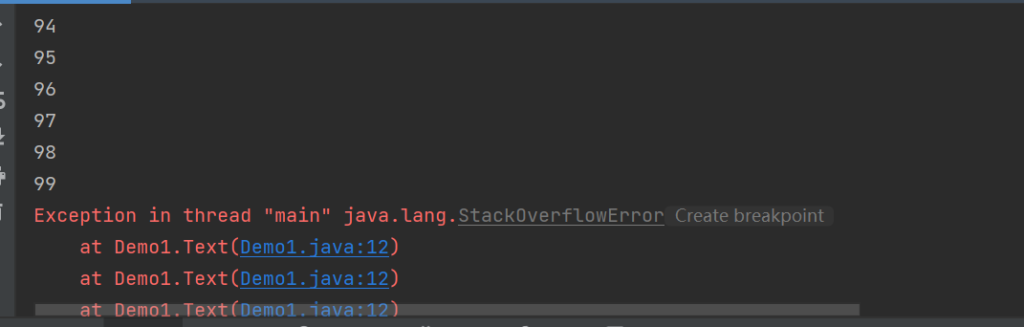
对象之间相互引用,最终会导致栈溢出
所以就需要加入边界条件了。
递归结构包括两个部分:
递归头:什么时候不调用自身方法,没有递归头,会陷入死循环
递归体:什么时候需要调用自身方法
所以之前的代码是没有递归头,有递归体。
public class Demo {
    public static void main(String[] args) {
//            Text(0) ;
            Text(9999);
    }

    public static int Text (int b ){
        if (b <= 10){ //递归体
            System.out.println(b);
            return 10 ;
        }else {
            return Text(b-1) ;//递归头
        }

}
修饰符 Static#
static 修饰的变量#
没加 static
public class MI{
    int P = 10;  //普通变量 P
    public void BB (){
        System.out.println(P);
    }
}
调用输出
public class iiuiu {
    public static void main(String[] args){
    MI M1 = new MI();
    M1.P = 100; //给实例 M1的变量 P 赋值
    M1.BB();

    MI M2 = new MI();
    M2.BB();
    }
}
输出的结果:
100
10
加入 static (在同一个类里面创建的所有对象共享一个值)
public class MI{
    static int P = 10; //静态变量 P
    public void BB (){
        System.out.println(P);
    }
}
调用输出
public class Phone {
    public static void main(String[] args){
    MI M1 = new MI();
    M1.P = 100;
    M1.BB();

    MI M2 = new MI();
    M2.BB();
    }
}
输出结果:
100
100
static 修饰的方法#
用 static 修饰的方法,不属于某一个对象,属于某一个类。
public class House {
    static int A ; //静态变量A
    public static void DDD(){ //静态方法DDD
        A = 10;
    }
}
在静态方法中只能使用静态变量,而普通方法中可使用普通变量和静态变量
数组#
- 数组是相同类型数据的有序集合
- 数组描述的是相同类型的若干的数据,按照一定的先后次序排列组合而成
- 其中,每个数据称作每个数组元素,每个数组元素可以通过一个下标来访问
数组的声明与创建#
声明数组变量,才能在程序中使用数组
数组里的元素是按照索引访问的,索引从零开始。
声明数组变量#
/*
声明数组
dataType[] arrayRefVar;   // 首选的方法
或

dataType arrayRefVar[];  // 效果相同,但不是首选方法
*/
/*
创建数组并赋值
arrayRefVar = new dataType[arraySize];
arrayRefVar [] = value ;
*/


public class Demo {
    public static void main(String[] args) {
        int[] int1 ;//声明int数组,名为int1
        int1 = new  int [10] ;//创建有10个空间数组
        int1[0] =  10 ;//给数组第一个数赋值10
        System.out.println ("int1 [0]=" + int1 [0]);//输出
    }

}
输出结果为
int1 [0]=10给数组元素循环赋值#
public class Demo {
    public static void main(String[] args) {
        int[] int1 ;//声明int数组,名为int1
        int1 = new  int [10] ;//创建有10个空间数组
        for (int i = 0 ;i <int1.length;i ++){ /*定义整数i,arrays.length获取数组长度*/
            int1 [i] = i ; //将i循环赋值给数组对应的元素
            System.out.println ( int1 [i]);//输出各个元素
        }
    }

}初始化以及内存分析#
内存分析#
- 堆
存放New的对象和数组
所有线程共享,不会存放别的对象引用
- 栈
存放基本变量类型(会包含那个基本类型的具体数值)
引用对象的变量(会保存这个引用在堆里面的具体地址)
- 方法区
可以被所有线程共享
包含了所有class和static变量
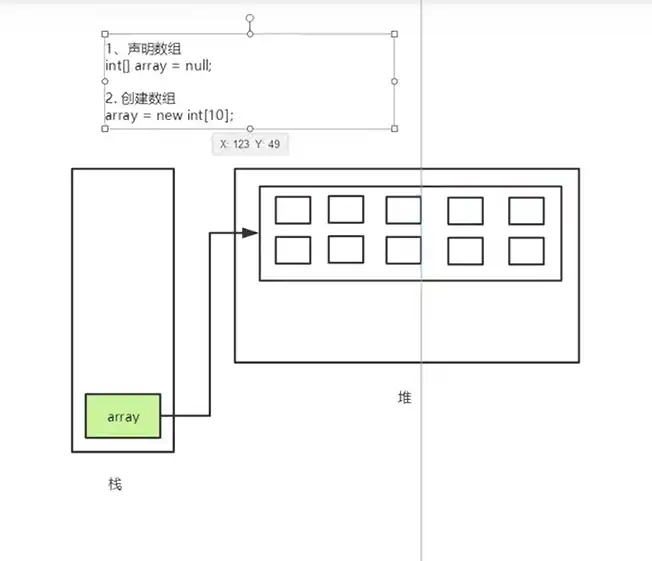
三种初始化#
- 静态初始化
int [] a = {1,2,3} ;  //创建 + 赋值  (静态初始化)
Man [] mans = {new Man(1,1),new Man(2,2)} ;- 动态初始化
int [] a = new int[2] ; //包含默认初始化 (动态初始化,默认值为0)
a [0] = 1 ;
a [1] = 2 ;- 数组的默认初始化
数组是引用类型,它的元素相当于实例变量,一旦定义将被默认初始化,默认值为0.
数组的使用#
基础使用#
- 遍历数组中所有元素
public class Demo {
    public static void main(String[] args) {
        int[] a = {1,2,3,4,5} ;
        for (int b = 0 ;b<a.length;b++){  //遍历数组元素
            System.out.println(a[b]);
        }
    }
}- 所有元素的和
public class Demo {
    public static void main(String[] args) {
        int d = 0 ;

        int[] a = {1,2,3,4,5} ;
        for (int c = 0 ;c <a.length; c++){
            d = d + a[c] ;
        }
        System.out.println("所有元素和 =" + d);
    }
}- 数组中元素最大值
public class Demo {
    public static void main(String[] args) {


        int[] a = {1,2,3,4,5} ;
        int Max = a[0] ;
        for (int e = 0 ; e<a.length ; e++){
            if (Max < a[e]){
                    Max = a[e] ;
            }
        }
        System.out.println("Max =" + Max);
    }
}进阶使用#
- For - Each循环
JDK1.5以上出现的功能,相当于jAVA自己自带循环
public class Demo {
    public static void main(String[] args) {
        int[] a = {1,2,3,4,5} ;

        for (int b : a ){
//for - each遍历数组
            System.out.println(b);
        }

    }
}- 输出数组的元素
public class Demo {
    public static void main(String[] args) {

        int[] a = {1,2,3,4,5};

        Text(a) ;

    }
    public static void Text (int[] a){
        for (int b = 0 ;b<a.length;b++){  //遍历数组元素
            System.out.print(a[b] + "\n");
        }
    }

}- 反转数组
public class Demo {
    public static void main(String[] args) {
        int[] a = {1,2,3,4,5};


       int[] II =  TText(a) ;
       Text(II);
    }

    public static void Text (int[] a){
        for (int b = 0 ;b<a.length;b++){  //遍历数组元素
            System.out.print(a[b] + "\n");
        }
    }


    public static int[] TText (int[] a) {
        int[] G = new int[a.length] ;

        for (int Y = 0,U = a.length - 1;Y<a.length;Y++,U--){
            G[U] = a[Y] ;
        }
        return  G;
        }

}二维数组#
每个元素都是一维数组的数组
int[] [] a = new int [2] [5] ;
int [] [] a = {{1,2,3,4,5},{6,7,8,9,0}} ;
遍历二维数组
public class Demo {
    public static void main(String[] args) {
        int[] [] a = {{1,2},{3,4},{5,6}};

        for (int i = 0;i<a.length;i++){ //{1,2}{3,4}{5,6}
            for (int t =0;t<a[i].length;t++){ //1,2,3,4,5,6
                System.out.println(a[i][t]);
            }
        }
    }
}泛型#
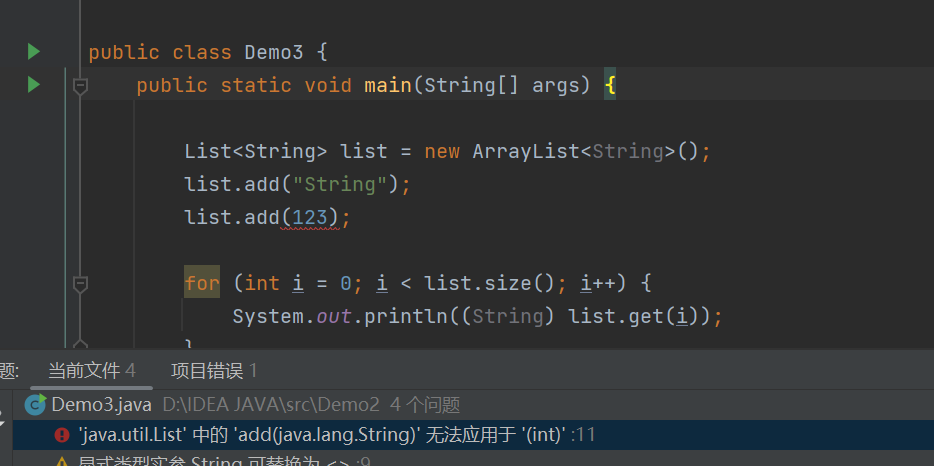
泛型的本质就是"参数化类型”。一提到参数,最熟悉的就是定义方法的时候需要形参,调用方法的时候,需要传递实参。那"参数化类型"就是将原来具体的类型参数化.
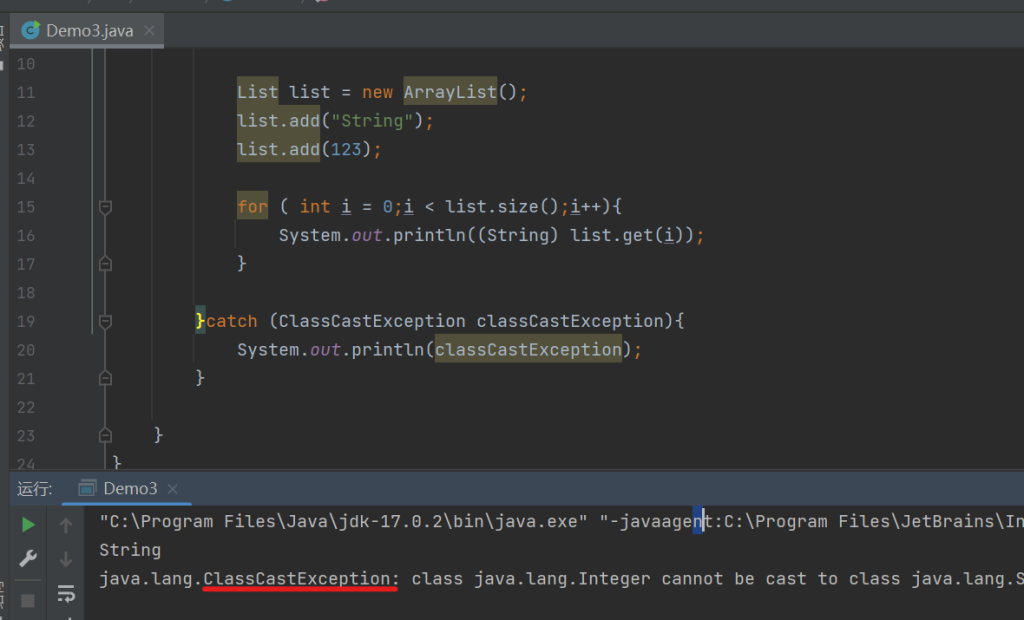
目的是为了避免强制格式转换带来的ClassCastException,类型转化异常。
不使用泛型
import java.util.ArrayList;
import java.util.List;

public class Demo {
    public static void main(String[] args) {

        try {

            List list = new ArrayList();
            list.add("String");
            list.add(123);

            for ( int i = 0;i < list.size();i++){
                System.out.println((String) list.get(i));  //(String)强制转化
            }

        }catch (ClassCastException classCastException){
            System.out.println(classCastException);
        }

    }
}运行这段代码会发现出现了强制转换带来的ClassCastException 转化异常。
就需要使用泛型来规范化
import java.util.ArrayList;
import java.util.List;

public class Demo {
    public static void main(String[] args) {

        List<String> list = new ArrayList<String>();  //使用泛型
        list.add("String");
        list.add(123);

        for (int i = 0; i < list.size(); i++) {
            System.out.println((String) list.get(i));
        }

    }
}
排序算法#
冒泡排序#
- 比较数组中,两个相邻的元素,如果第一个数比第二个数大,我们就交换它的位置
- 每一次比较,都会产生一个最大,或者最小的数字
- 下一轮则可以减少一次排序
- 一次循环直到结束
代码实现#
    public static int[] T(int[] a){  //名为T的冒泡排序
        int Y = 0;//临时变量

        for (int Q = 0;Q<a.length-1;Q++){ //列表多少个元素,循环次数的作用
            for (int W = 0;W<a.length-1-Q;W++){ //每次循环减少,循环次数
                if (a[W]>a[W+1]){//比大小
                    Y = a[W] ; //大的值赋给临时变量
                    a[W] = a[W+1] ; //小的值前移
                    a[W+1] = Y ; //大的值赋给后面
                }
            }
        }
        return a ;
}完整代码#
public class Demo1 {
    public static void main(String[] args) {
    int [] a = {1,3,4,2,5,6,9,7} ;
    Text(T(a)) ;
    }


    public static int[] T(int[] a){  //名为T的冒泡排序
        int Y = 0;//临时变量

        for (int Q = 0;Q<a.length-1;Q++){ //列表多少个元素,循环次数的作用
            for (int W = 0;W<a.length-1-Q;W++){ //每次循环减少,循环次数
                if (a[W]>a[W+1]){//比大小
                    Y = a[W] ; //大的值赋给临时变量
                    a[W] = a[W+1] ; //小的值前移
                    a[W+1] = Y ; //大的值赋给后面
                }
            }
        }
        return a ;
    }

    public static void Text (int[] a){
        for (int b = 0 ;b<a.length;b++){  //遍历数组元素显示
            System.out.print(a[b] + "\n");
        }
    }

}稀疏数组#
定义#
当一个数组中大部分的元素为0,或为同一个值的数组时,可以使用稀疏数组来保存该数组。
代码#
打印输出二维数组
public class Demo1 {
    public static void main(String[] args) {
        /** 创建一个原始的二维数组(11行11列)
         0:表示没有棋子
         1:表示黑子
         2:表示白子*/
        int Arrays[][] = new int[11][11];
        Arrays[10][2] = 1;
        Arrays[3][3] = 2;

        System.out.println("最初的二维数组为:");

        int Value = 0;
        for (int row = 0;row < Arrays.length;row++) {//循环行(遍历)
            for (int column =0;column < Arrays[row].length;column++) {//循环列(遍历)
                System.out.printf("%d\t", Arrays[row][column]);//遍历数组输出 , %d表示转为十进制数,\t是制表符
                Value ++ ;
            }
            System.out.println();
        }
        System.out.println("=================================");
        int[][] Array1 =new  int[Value+1][3];

        int Time = 0 ;
        for (int row = 0;row < Arrays.length;row++) {//循环行(遍历)
            for (int column = 0; column < Arrays[row].length; column++){//循环列(遍历)
                if(Arrays[row][column] != 0){
                    Array1[Time][0] = row;
                    Array1[Time][1]= column;
                    Array1[Time][2] = Arrays[row][column];
                    Time ++ ;
                }
            }
        }

        System.out.println("稀疏数组");

        Array1[3][0] = 11;
        Array1[3][1] = 11 ;
        Array1[3][2] = 2 ;
        for (int i = 0;i<Array1[i].length;i++){
            System.out.println(Array1[i][0] + "\t"+ Array1[i][2] + "\t" + Array1[i][2] + "\t");
        }

    }
}
输出结果:
最初的二维数组为:
0	0	0	0	0	0	0	0	0	0	0
0	0	0	0	0	0	0	0	0	0	0
0	0	0	0	0	0	0	0	0	0	0
0	0	0	2	0	0	0	0	0	0	0
0	0	0	0	0	0	0	0	0	0	0
0	0	0	0	0	0	0	0	0	0	0
0	0	0	0	0	0	0	0	0	0	0
0	0	0	0	0	0	0	0	0	0	0
0	0	0	0	0	0	0	0	0	0	0
0	0	0	0	0	0	0	0	0	0	0
0	0	1	0	0	0	0	0	0	0	0
=================================
稀疏数组
3	2	2
10	1	1
0 0 0 面向对象#
类的定义#
/**
[修饰符]class 类名{
//成员变量
//构造方法
//成员方法
 }
*/成员变量#
/**
[修饰符]变量类型 变量名字 [= 默认值] ;
其中"修饰符"和"默认值"不是必须的。
修饰符有:
[public  protexted  private]
[static](static只执行一次)
[final]
定义在类里面
*/
int A ;
int B = 10 ;
public int C ;
protected int D ;
private int E ;
static int F ;
final int G ;定义成员变量#
public class Demo {
    int A = 10; //成员变量 A
    public static void main(String[] args) {
    Demo Demo = new Demo();
    }
    public Demo() {  //构造方法Demo
        System.out.println("Hello,World!");
    }
}构造方法#
和类名相同,自动调用
public class Demo {
    public static void main(String[] args) {
    Demo Demo = new Demo();
    }
    public Demo() {  //构造方法Demo
        System.out.println("Hello,World!");
    }
    public Demo(int R,int E){
        System.out.println("使用两个参数的构造方法");
    }
}成员方法#
    /**
     [修饰符]返回值类型 方法名{
    语句
     }
     */
    public int NP(int G){
        return G;
}构造方法重载#
两个方法方法名相同,但是参数列表不同,称为重载
    public Demo(double U){
        System.out.println("使用构造方法");
    }

    public Demo(int Y){
        System.out.println("使用构造方法重载");
    }
调用以上方法
public class PPP {//新建PPP的类
    public static void main(String[] args) {
        AAA N = new AAA(1.2);//将带有成员方法和构造方法的类实例化
        System.out.println("成员方法" + N.NP(8)); //成员方法调用
        AAA N1 = new AAA(1);//调用
        AAA N2 = new AAA(7,4);
    }
}
public class AAA {
public int NP(int G){ //成员方法
return G;
}
public AAA(double U){ //构造方法
System.out.println("使用构造方法");
}
public AAA(int Y){ //构造方法
System.out.println("使用构造方法重载");
}
public AAA(int R,int E){ //构造方法
System.out.println("使用两个参数的构造方法");
}
}输出结果:
使用构造方法
成员方法8
使用构造方法重载
使用两个参数的构造方法
This 关键字#
在类的方法中引用自身
Student类代码
public class Student {
    String name = "";
    int age ;
    double Math ;
    double Chinese ;
    double English ;

   public Student(String name,int age,int English,int Math,int Chinese){
       this.name = name;
       this.age = age ;
       this.English = English ;
       this.Math = Math ;
       this.Chinese = Chinese ;
    }

   public void printStudentInfo(){
        System.out.println("姓名:" + this.name + " 年龄:"+ this.age + " 各科成绩:" + "语文:" + this.Chinese + "数学:" + this.Math + "英语:" + this.English );
    }
    public void printStudentInfo(String E , int A){
        System.out.println("姓名:" + name + " 年龄:"+ age);
    }
}
调用Student代码
public class TestStudent {
    public static void main(String[] args) {
        Student Student1 = new Student("",0,0,0,0);
        Student1.name = "哈吉";
        Student1.age = 12;
        Student1.English = 123;
        Student1.Math = 123;
        Student1.Chinese=123;
        Student1.printStudentInfo("123",123);
        Student1.printStudentInfo();
        System.out.println("===================");
        Student Student2 = new Student("张天",12,92,86,87);
        Student2.printStudentInfo();
        Student2.printStudentInfo("张天",12);
    }
}方法的参数传递#
当初参数是基本数据类型的时候,经过方法输出后参数不变,如果是引用数据类型,会改变
//引用数据类型当参数
public class Demo {
    public static void main(String[] args) {
        int[] AA = {50,100};

        Data(AA);
        System.out.println("AA[0]= " + AA[0] + ", AA[1]= " + AA[1]);
    }
    public static void Data(int[] BB){
        int AP = BB[0];
        BB[0] = BB[1];
        BB[1] = AP;
        System.out.println("BB[0]= "+ BB[0] + " ,BB[1]= " + BB[1]);
    }
}
输出结果:
BB[0]= 100 ,BB[1]= 50
AA[0]= 100, AA[1]= 50
//基本数据类型当参数
public class Demo {
public static void main(String[] args) {
int a = 100;
int b = 50;
Data(a,b);
System.out.println("a= " + a + ", b= " + b);
}
public static void Data(int x,int y){
int AP = x;
x = y;
y = AP;
System.out.println("x= "+ x + " ,y= " + y);
}
}输出结果:
x= 50 ,y= 100
a= 100, b= 50
可变长参数
public class GongSi { //输出
    public void BuMen (String A,String...B){  //String... 为可变长参数,需要遍历输出,String为数据类型
        System.out.println("部门为 " + A);
        for (int i =0; i <B.length;i++){
            System.out.println("人员为 " + B[i]);
        }
    }
}


public class Demo { // 赋值输出
    public static void main(String[] args) {
        GongSi GongSi = new GongSi();
        GongSi.BuMen("123不mean","123123123人","123123啊的时间弄多久哦爱仕达");
    }
}隐藏,封装和继承#
封装#
封装是面向对象的三大特征之一,将对象的状态信息隐藏在内部,不允许外部程序直接访问对象。
Private关键字#
在变量前加 private 可以封装变量,封装后只能在同一个类中修改。
public class Demo1 {
    private int G = 10; //封装变量G
}


public class Demo {
    public static void main(String[] args) {
    Demo1.G = 100;  //修改变量G,这时会报错
    }
}
报错提示:
java: G 在 Demo2.Demo1 中是 private 访问控制要使用方法来赋值:
class Demo1 {
    private int G = 10;

    public int SetG(int G){  //在原来的类中写方法
        this.G = G ;
        return this.G;
    }
}


public class Demo {
    public static void main(String[] args) {
    Demo1 demo1 = new Demo1();
     int P = demo1.SetG(1000); //通过方法赋值
    System.out.println(P);
    }
}
继承 extends#
继承是面向对象的三大特征之一
//[修饰符] class 子类名 extends 父类名(){}重写父类方法
直接添加方法
//父类
class Person {
    String name ;
    int age;

    public Person(){

    }

    public Person(String name ,int age){
        this.name = name;
        this.age = age;
    }

    public void say(){
        System.out.println(name + " say,I`m " + age +" years old" );
    }
}


//子类
public class Person1 extends Person{

    public void say(){ //这里重写了say的无参方法
        System.out.println(name + " no say " );
    }

    public static void main(String[] args) {
        Person1 Qin = new Person1();
        Qin.name ="Qin";
        Qin.say();
    }
}
输出结果:
Qin no say 这样做的问题是会导致继承的类中方法无法使用,就要用super来代替父类调用:
class Person {
    String name ;
    int age;

    public Person(){

    }

    public Person(String name ,int age){
        this.name = name;
        this.age = age;
    }

    public void say(){
        System.out.println(name + " say,I`m " + age +" years old" );
    }
}


//子类
public class Person1 extends Person{  //子类
    public void say(){
        super.say();//用super来调用父类的say方法
        System.out.println(name + " no say " );
    }

    public static void main(String[] args) {
        Person1 Qin = new Person1();
        Qin.name ="Qin";
        Qin.say();
    }
}
输出结果:
Qin say,I`m 0 years old
Qin no say
如果父类中有构造方法,子类中必须有构造方法,而且必须调用
//使用super继承父类的构造方法
//子类
class Trees extends Tree{
    int number ;

    public static void main(String[] args) {
        Trees Trees = new Trees();
        Trees.number = 100 ;
        Trees.flower();

    }

    public Trees (){

        System.out.println("子类无参构造");
    }

    //如果父类中有不带参数的构造方法,子类会自动调用
    public Trees (String name ,String kind,int number){
        super(name,kind); //注意:父类的构造方法必须要在子类构造方法的第一行
        this.number = number;
    }

    public void flower(){
        System.out.println("这是 " + kind + " ,名为 " +name + " ,一共" + number + "棵");
    }
}


//父类
public class Tree {
    String name  = "桃树";
    String kind = "果树";

    public Tree(){

        System.out.println("父类无参构造");
    }

    public Tree(String name ,String kind){
        this.name = name ;
        this.kind = kind ;
    }
    public void flower(){
        System.out.println("这是 " + kind + " ,名为 " +name + " .");
    }
}
输出结果:
父类无参构造
子类无参构造
这是 果树 ,名为 桃树 ,一共100棵多态#
指同样的操作作用于不同的对象,可以有不同的解释,产生不同的执行结果.
向上转型#
父类引用指向子类对象为向上转型,语法格式如下:
fatherClass obj = new sonClass();向上转型就是把子类对象直接赋给父类引用,不用强制转换。使用向上转型可以调用父类类型中的所有成员,不能调用子类类型中特有成员,最终运行效果看子类的具体实现。
package Demo2;
class Animal{
    String Name = "Aninal" ;
    String Say = "SAYYY";

    public Animal(String name, String say) {
        this.Name = name;
        this.Say = say;
    }

    public Animal() {
    }

    public void Say(){
        System.out.println( " Name: " +  Name +  " Say: " + Say);
    }
}


class Dogs extends Animal{
    public void Say(){
        System.out.println( " Say: " + Say + " Name: " + Name );
    }

    public void Run() {
        System.out.println(Name + "Run");
    }

}

public class Test222 {
    public static void main(String[] args) {
        Animal animal = new Dogs();  //向上转型
        animal.Say();
        animal.Run();
        }
}
这里会看到报错:
java: 找不到符号
  符号:   方法 Run()
位置: 类型为Demo2.Animal1的变量 Dog1向下转型#
与向上转型相反,子类对象指向父类引用为向下转型,语法格式如下:
sonClass obj = (sonClass) fatherClass;向下转型可以调用子类类型中所有的成员,不过需要注意的是如果父类引用对象指向的是子类对象.
class Animal{
    String Name = "Aninal" ;
    String Say = "SAYYY";

    public Animal(String name, String say) {
        this.Name = name;
        this.Say = say;
    }

    public Animal() {
    }

    public void Say(){
        System.out.println( " Name: " +  Name +  " Say: " + Say);
    }
}


class Dogs extends Animal{
    public void Say(){
        System.out.println( " Say: " + Say + " Name: " + Name );
    }

    public void Run() {
        System.out.println(Name + "Run");
    }
    public static void main(String[] args) {
        Animal animal = new Dogs();  // 向上转型
        Dogs dogs = (Dogs) animal;  //向下转型
        dogs.Say();
        dogs.Run();
    }
}
输出结果:
 Say: SAYYY Name: Aninal
AninalRun初始化块#
初始化块
- 作用类似构造方法,可以对对象进行初始化操作。
- 无法传入任何参数,可以理解为提前执行的代码
使用初始化块
//class 类名{
//[修饰符]{
//        初始化块的可执行代码
//    }
//}

class Demo{
    {
        System.out.println("初始化块");
    }

    public Demo(){
        System.out.println("构造方法");
    }

}

public class Demo1 {
    public static void main(String[] args) {
        Demo Demo = new Demo();
    }
}
注意: 如果有静态初始化块,会优先执行
class Demo1{
    static {
        //属于类
        System.out.println("静态初始化块");
    }
    {
        //属于对象  在初始化块中的变量属于局部变量,需要初始化
        System.out.println("初始化块");
    }
    public Demo1(){
        //属于对象
        System.out.println("构造方法");
    }
}

public class Demo {
    public static void main(String[] args) {
        Demo1 Demo = new Demo1();
    }
}
运行结果:
静态初始化块
初始化块
构造方法
Final 修饰符#
final 关键字可用于修饰类,变量和方法。用来表示修饰的变量不可改变。
一旦初始化就无法赋值了。
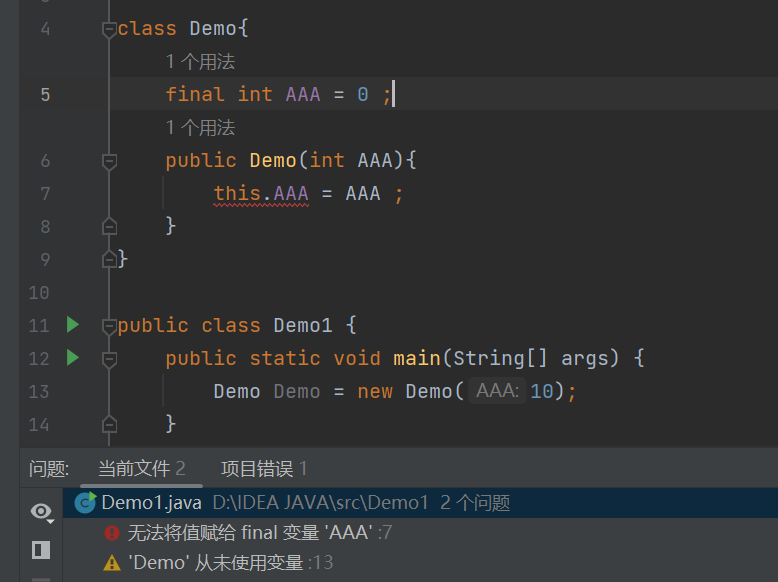
final 只能在定义时,构造方法里以及初始化块中,无法在Main方法中赋值
\[/warning\]- Final 修饰变量
定义必须初始化,一旦初始化就无法赋值
class Demo{
    final static int A  ;
    final int B  ;
    final int C = 10 ;  //定义

    static {  //静态初始化块
        A = 10 ;
    }

    public Demo (){ //构造方法
        B = 10 ;
    }

    public int getA(){
        return A ;
    }
    public int getB(){
        return B ;
    }

    public int getC(){
        return C;
    }

}

public class Demo1 {
    public static void main(String[] args) {

        Demo Demo = new Demo();

        System.out.println(Demo.getA());
        System.out.println(Demo.getB());
        System.out.println(Demo.getC());

    }

}- Final修饰数组
指向的地址无法改变,可以改变数组中元素的值
public class Demo {
    public static void main(String[] args) {
        final int[] Arr = {1,2,3};  //定义数组Arr 元素有 1,2,3
        for (int i = 0;i<Arr.length;i++){
            Arr[i] = Arr[i] * 2 ;  //元素大小乘2
            System.out.print(Arr[i] +" ," );  //遍历输出
        }
    }
}
输出结果:
2 ,4 ,6 ,- Final 修饰方法
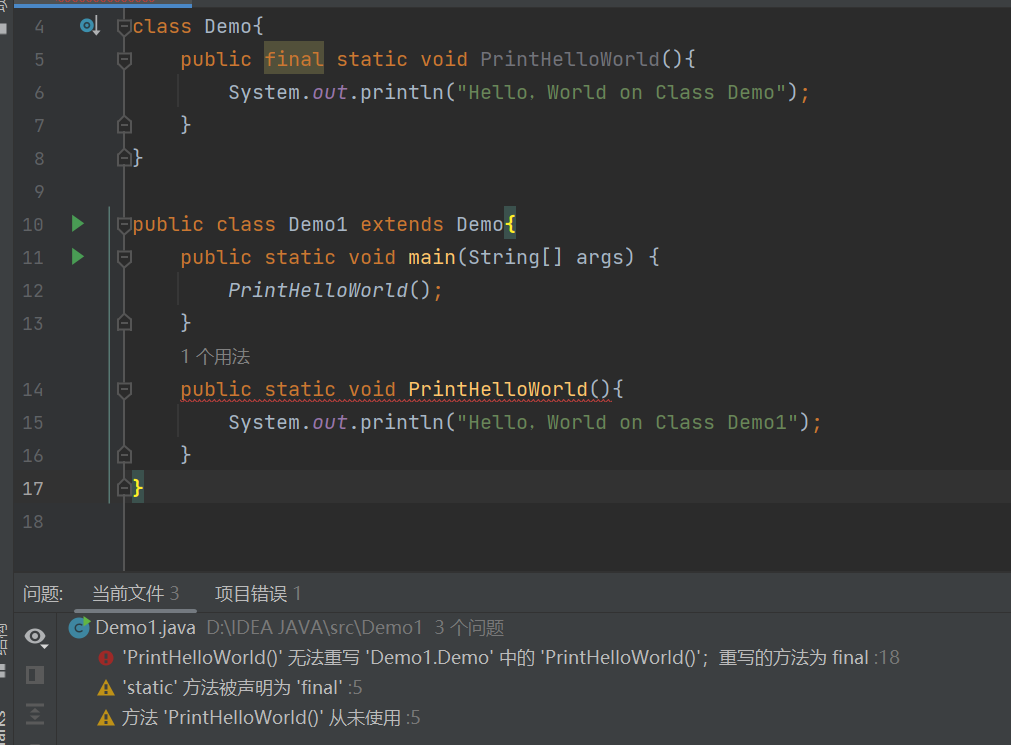
如果有子类,则无法对加 Final 的方法进行重写
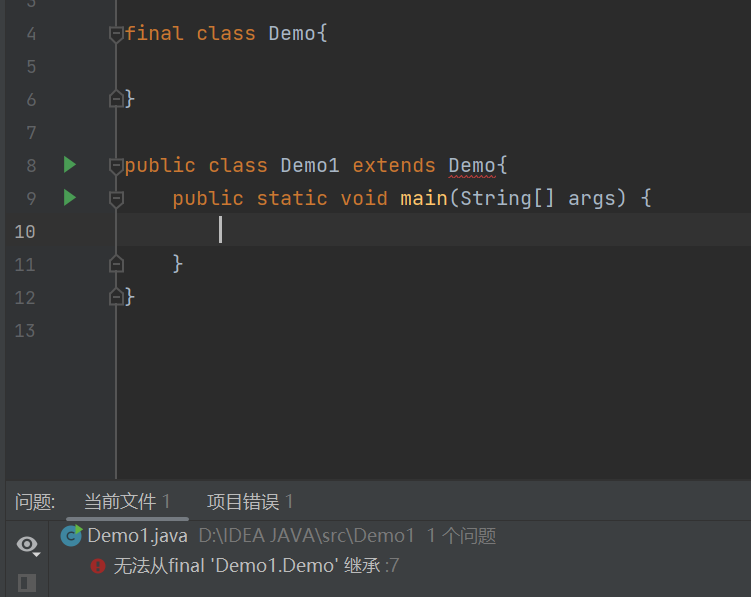
- Final 修饰类
将无法被继承
抽象类(abstract )#
不包含方法体的方法称为 “抽象方法”,(在JAVA中只要有花括号括起来的都是方法体)
- 作用&注意
拿来当父类使用,无法被实例化,abstract方法只能存在于abstract类中,abstract方法只能被重写
无法修饰属性,无法修饰构造方法,abstract只有重写才有意义
abstract class DemoAbstract {
    public abstract void Print1();  //抽象方法 Print1
    public void Print2(){ //普通方法 Print2
        System.out.println("DemoAbstract.Print2");
    }
}
public class Demo extends DemoAbstract{
    public void Print1(){  //重写抽象方法
            System.out.println("Demo.Print");
    }

    public static void main(String[] args) {
        Demo Demo = new Demo();
        Demo.Print1();  //继承重写的抽象方法
        Demo.Print2();  //抽象类写的普通方法
    }
}
abstract无法和final同时使用
abstract 构造方法
abstract class DemoAbstract {

    String Name ;

    public DemoAbstract(String Name){
        this.Name = Name;  //抽象类中的构造方法 DemoAbstract
    }

}

public class Demo extends DemoAbstract{

    public Demo(String Name){  //子类的构造方法
        super(Name); //super调用父类 DemoAbstract 的构造方法
    }

    public static void main(String[] args) {
        Demo Demo = new Demo("Name");
        System.out.println(Demo.Name);  //输出父类 DemoAbstract 的属性 Name 的值
    }

}接口#
JAVA通过接口来实现多继承
定义接口#
public interface interface1 {  //public intaerfasce 接口名
    //变量全是静态变量
    public void Print();  //接口中的方法默认都是抽象方法(public abstract), public abstract可以省略

}实现(继承)接口时,使用implements关键字来实现,而不是extends。
而接口继承接口时,使用extends
interface interface1 {
    public void PrintInterFace();

}

interface interface2 extends interface1{  //extends继承接口
    public void PrintInterFace2();
}

abstract class TestClass{
    public void PrintClass(){
        System.out.println("PrintClass");
    }
}


public class TestInterface extends TestClass implements interface1,interface2{

    @Override
    public void PrintInterFace() {  //重写接口1的PrintInterFace静态方法
        System.out.println("PrintInterFace1");
    }

    @Override
    public void PrintInterFace2() {  //重写接口2的PrintInterFace2静态方法
        System.out.println("PrintInterFace2");
    }

    @Override
    public void PrintClass() {  //重写抽象类的抽象方法
        super.PrintClass();
    }

    public static void main(String[] args) {
        TestInterface TestInterface = new TestInterface();
        TestInterface.PrintInterFace();
        TestInterface.PrintInterFace2();
        TestInterface.PrintClass();
    }
}内部类#
内部类可以直接使用父类的私有(private)变量,而继承无法使用。
class OutClass{  //外部类
    private int A = 10 ;
    class InClass{  //内部类
        public void PrintIn(){   //内部类方法
            System.out.println(A+10);
        }
    }
    static class StatiInClass{  //内部静态类
        public static void PrintStatic(){  //内部静态类方法
            System.out.println("StaticInClass");
        }
    }
    public void PrintOut(){  //外部类方法
        System.out.println(A);
    }
}

public class Demo {
    public static void main(String[] args) {
        OutClass OC = new OutClass();
        OC.PrintOut();  //外部类 PrintOut()
        OutClass.InClass IC = OC.new InClass();  //通过外部类对象来定义内部类的对象
        //格式为 : 外部类名.内部类名 对象名 = 外部类对象 . new 内部类() ;
        IC.PrintIn();  //内部类 PrintIn()
        //直接使用 外部类名.内部类名 对象名 = new 外部类名.内部类名(); 来实例化
        OutClass.StatiInClass  SC= new OutClass.StatiInClass();
        SC.PrintStatic();
    }
}
要在内部类方法中调用外部类中的值,使用 外部类名.this.变量名 来实现。
API#
可以直接调用的方法集合
    public static void main(String[] args) {
        String S1 = "HEKHHKjpg";
        String S2 = "123123";

        String S3 = S1.concat(S2);  //使用concat连接字符串
        System.out.println(S3);

        System.out.println("=================1. replace===================");
        //replace来替换字符串
        String S4 = S2.replace('2','R');//使用API将所有的2替换为R
        System.out.println(S4);

        System.out.println("===================2.substring=================");
        //substring截取字符串
        String S5 = S1.substring(1,3);//去索引值,包含开不包含最后一个'
        String S6 = S2.substring(1); //
        System.out.println(S5);
        System.out.println(S6);

        System.out.println("====================================");
        //toLowerCase将所有字符转为小写,toUpperCase转为大写
        String S7 = S1.toLowerCase();
        String S8 = "lllllll";
        String S9 = S8.toUpperCase();
        System.out.println(S7);
        System.out.println(S9);

        System.out.println("====================================");
        //trim将首尾的空格去掉
        String S10 = "    HE    EH       ";
        System.out.println("" + S10 + "");
        String S11 = S10.trim();
        System.out.println("" + S11+ "");

        System.out.println("====================================");
        //charAt返回固定位置的字符
        char S12 = S1.charAt(1);
        System.out.println(S12);

        System.out.println("====================================");
        //endsWith判断末尾是否为某字段结尾
        boolean B1 = S1.endsWith(".jpg");
        System.out.println(B1);

        System.out.println("================indexOf====================");
        //indexOf判断字符或者字符串再当前字符串中的位置
        int I1 = S1.indexOf(".jpg");
        System.out.println(I1);

        System.out.println("===============length=====================");
        //length判断字符长度
        int I2 = S1.length();
        System.out.println(I2);

        System.out.println("===============equals=====================");
        //equals判断两个字符串是否相等
        boolean B2 = S1.equals(S2);
        boolean B3 = S1.equals(S1);
        boolean B4 = S1.equals(S1.toLowerCase());
        System.out.println("S1.equals(S2)" + B2);
        System.out.println("S1.equals(S1)" + B3);
        System.out.println("S1.equals(S1.toLowerCase())" + B4);

        System.out.println("===============split=====================");
        //split分割字符串
        String[] SP13 = S1.split("K");  //遇到K分割,返回数组
        for (int i = 0;i < SP13.length;i++){
            System.out.println(SP13[i]);
        }

        System.out.println("====================================");
        //ceil向上取整 ,floor向下取整,round四舍五入
        double D1 = -3.1415926;
        double D2 = Math.ceil(D1);
        System.out.println(D2);

        System.out.println("==================Max==================");
        //Max最大,Min最小,Abs绝对值
        double D3 = Math.max(1,2);
        double D4 = Math.min(1,2);
        double D5 = Math.abs(-12);//绝对值
        System.out.println(D3);
        System.out.println(D4);

        System.out.println("=================三角函数===================");
        //正弦
        double DS1 = Math.sin(Math.PI/6);  //弧度制表示角度
        //余弦
        double DS2 = Math.cos(Math.PI/6);
        //正切
        double DS3 = Math.tan(Math.PI/6);
        System.out.println("Math.sin(Math.PI):  " + DS1 + "\n Math.cos(Math.PI): " + DS2 + "\n Math.tan(Math.PI): " + DS3);


        System.out.println("=================幂运算===================");
        //pow幂运算 sqrt平方根 log10以10为底的对数
        double D6 = Math.pow(3,4);  //三的四次方
        double D7 = Math.sqrt(25);
        double D8 = Math.log10(233);

        System.out.println("=================随机数===================");
        //random 获得随机数
        double D9 = Math.random();

}异常#
异常是指程序运行当中出现的不期而至的情况。在程序运行期间,异常会影响正常程序的运行流程。
异常的分类#
- 检查性异常
最具代表的时用户在错误或者问题的时候发生的,比如打开一个不存在的文件等
- 运行时异常
运行时异常是容易被忽略的异常,运行时可以忽略
- 错误ERROR
错误不是异常,而是摆脱控制的问题。在代码中常常会发生。比如栈溢出等。
异常处理机制#
捕获异常
try - catch - finally
try{ } 里写入包含异常的代码,catch(){ }中写入捕获的异常
    public static void main(String[] args){
        try {  //包含异常的代码
            int A = (int) Math.random();
            System.out.println("A: " + A);
            int B = (int) Math.random();
            System.out.println("B: " +  B);
            int C = A/B;
        }catch(ArithmeticException EX){  //捕获异常 括号内捕获的异常要和try中异常相同
            System.out.println(EX);  //显示异常
        }

    }
输出结果:
A: 0
B: 0
java.lang.ArithmeticException: / by zero
如果要使用catch(){ }来捕获两个异常,catch则会捕获第一个匹配到的异常
public class Demo {
    public static void main(String[] args) {

        try {
            int A = (int) Math.random();
            System.out.println("A: " + A);
            int B = (int) Math.random();
            System.out.println("B: " + B);
            int C = A / B;  //除数为零异常

            int[] IA = {1, 2, 3, 4, 5};
            System.out.println(IA[5]);  //数组下标越界异常

        } catch (ArithmeticException AE) {  //捕获除数为零异常
            System.out.println(AE);
        } catch (ArrayIndexOutOfBoundsException AIOOE) {  //捕获数组下标越界异常
            System.out.println(AIOOE);
        }
    }
}
运行结果:
A: 0
B: 0
java.lang.ArithmeticException: / by zero
finally{ }的作用是无论是否发生异常,都会执行
public static void main(String[] args){
    try {
        int[] IA = {1,2,3,4,5};
    }catch(Exception A){
        System.out.println(A);
    }finally {
        System.out.println("finally");
    }
}
运行结果:
finally